LoggerNet 5
LoggerNet 5
OrderableNetwork Management and Data Software
Configuration
- LN5Core-1mo LoggerNet Network Management & Data SoftwareLN5Core-1moPart Number: 46566
- LN5Core-1yr LoggerNet Network Management & Data SoftwareLN5Core-1yrPart Number: 46567
Select a configuration to add to your quote
- Model:
- LoggerNet 5
- Item Number:
- LoggerNet5
- Warranty:
- No warranty
Overview
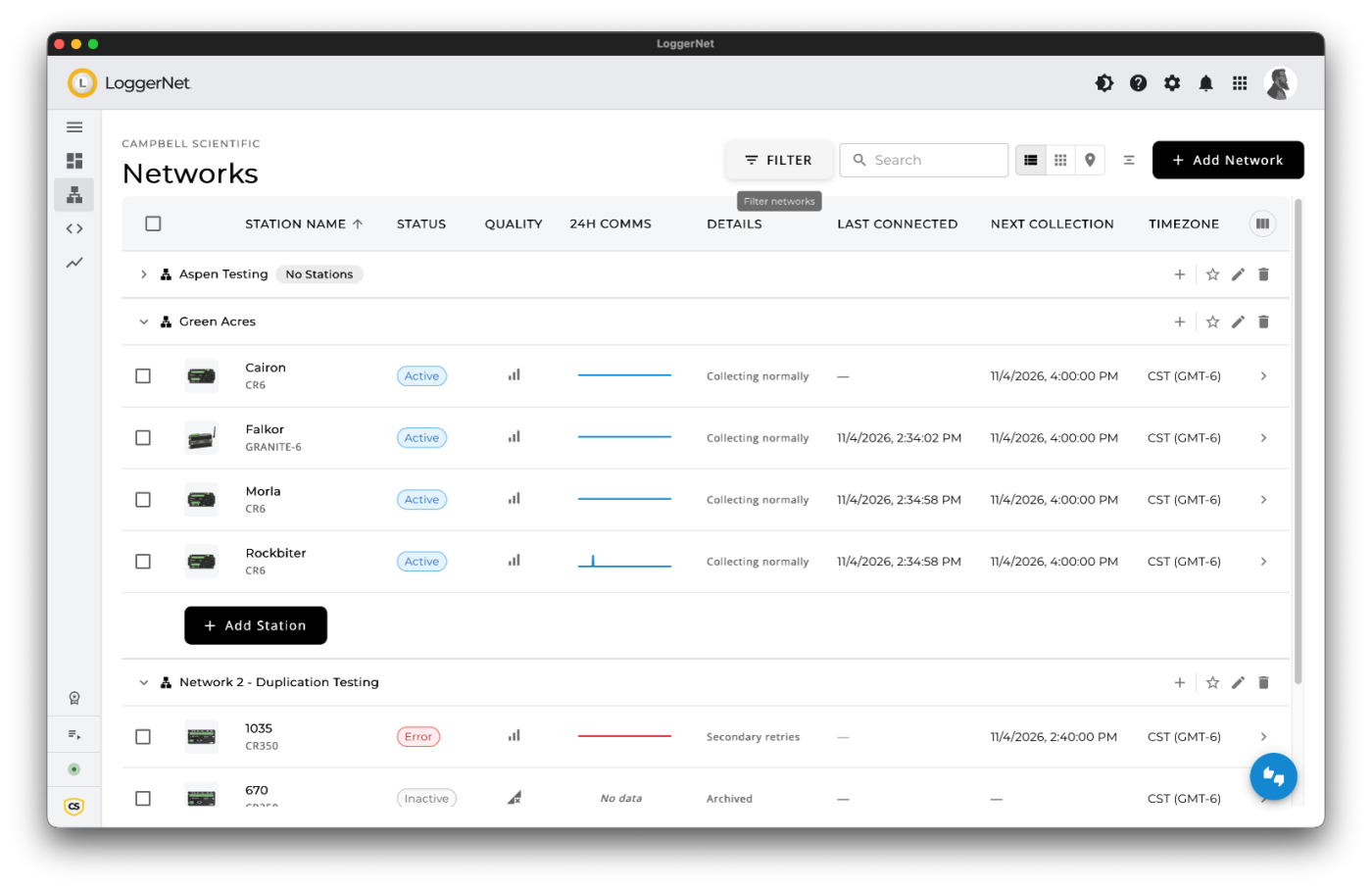
The devices are yours, and so is the data. LoggerNet 5 (LN5) is built on that principle. As Campbell Scientific’s standard device management software, LN5 puts you in control of your devices and your data, bringing your CR series and Aspen™ G2 dataloggers side-by-side. Your data is never locked inside our software; you decide how data is collected and where it goes.
LN5 makes device management easier than ever before. One modern, intuitive interface takes you from first connection to collecting data in fewer steps, whether you are configuring a single data logger at your desk or managing networks of stations across sites around the world. Set up, configure, and connect to devices locally or remotely; collect data on your schedule; and use batch device operations and status monitoring to keep large networks running with less effort. With your Campbell Scientific CR series and Aspen G2 dataloggers supported in the same software, you can match the hardware you need to each site without changing software tools.
LN5 runs on Windows, macOS, and Linux on the computers and servers you already have. This next generation of device management software supports devices and data from local connections, cellular links, and advanced wireless networks. Built on decades of trusted LoggerNet development, LN5 continues to improve and evolve with regular updates shaped by client feedback. The software is free to start, simple to use, and ready to scale. LN5 puts you in control, just as you would expect from a Campbell Scientific product.
Better Device Management, Simpler Setup, You're in Control. That's LoggerNet 5.
Key Advantages
- A modern interface to set up, program, monitor, and collect data from CR series and Aspen G2 dataloggers
- Installs locally on computers you already own and use
- Built from more than 20 years of proven LoggerNet reliability
Technical Description
LN5 is Campbell Scientific’s standard device management software, supporting applications ranging from a single data logger to networks of devices. It brings device configuration, programming, communications, data collection, and status monitoring together in one application.
A Modern, Unified Experience
- LN5 is not a reskin. It is a newly designed experience organized around the tasks engineers and technicians perform every day.
- One interface replaces the Setup, Connect, DevConfig, Status Monitor, and CRBasic Editor applications.
- Set up devices in fewer steps, from first connection to collecting data.
- Experience the same interface on Windows, macOS, and Linux.
- LN5 is built from more than 20 years of LoggerNet experience.
- Define multiple communications paths to a single station (such as USB, cellular, or IP) with a priority order. LN5 recognizes the station no matter which path it uses.
- Access devices locally or remotely.
- Install LN5 alongside LoggerNet 4, so existing systems keep running while you transition.
One Platform for Wired and Wireless Monitoring
- CR series and Aspen G2 wireless dataloggers are managed in the same software.
- Match the hardware to each site, from a full CR series-based system to an Aspen G2 that deploys in minutes, without changing software.
- Status monitoring of active hardware displays the operational health of every device and network at a glance.
- Run batch operations across multiple devices.
- Available functions include automated, scheduled data collection; real-time and historical data views; and remote device control.
An Open Platform: Your Devices, Your Data
LN5 carries the Campbell Scientific philosophy forward. The data you collect is yours. You control how it is collected and where it is stored. Your data is ready for third-party software integration and is never locked behind our software. LN5 connects to LoggerNet.io, the online portal where you download software; manage your organization, users, and billing; and access hosted services, such as an MQTT broker that extends LN5’s capabilities.
Accessible and Always Improving
- Configuring and managing a device is always free with a LN5 Free plan and DevConfig 5.
- Paid plans are a simple, low-cost subscription with the latest version always included.
- Regular updates are driven by clients with feedback and bug reporting tools built into the app.
Benefits
- A modern interface to reduce clicks and simplify everyday tasks
- Cross-platform support with the ability to run LN5 on Windows, macOS, or Linux
- One platform to manage CR series and Aspen G2 dataloggers
- Efficient network management with batch operations, flexible communications, and improved network status visibility to simplify managing devices at scale
- Scalable at your pace, starting with the Free plan and the ability to upgrade as needed
- Transition at your own pace by installing LN5 alongside LoggerNet 4
Specifications
General and Product Information
- Product Name/Model Number
- LoggerNet Core, 1 month: PN 46566LoggerNet Core, 1 year: PN 46567
- Software Architecture
- Stand-alone desktop application with supporting web services
Licensing and Pricing
- License Model
- Subscription
(monthly or annually)
- Plans/Tiers Available
- Free and Core
- Station/Device Limit per Plan
- Free: up to two stationsCore: unlimited stations
- Billing Terms (Monthly/Annual)
- Billed per subscription period
- Free Plan/Trial
- Full feature set of Free plan
- License Activation Method
- Manage licenses at LoggerNet.io and claim or upgrade the license in the LoggerNet application.
- Offline/Air-Gapped Activation
- Supported via file-based offline activation
- Installations/Seats per License
- The license supports a single installation.
- Upgrade Path from LoggerNet 4
- Can be installed alongside an existing version of LoggerNet 4
System Requirements
- Operating Systems
- Windows 11 or newermacOS 15 or newerLinux RPM and DEB packages
- Processor Architecture
- Support for macOS ARM, Linux ARM, Linux x64, and Windows x64
- Run-Time Dependencies
- None; self-contained installer
- Minimum Hardware (CPU, RAM, Disk Space)
- 4 GB RAM
(8 GB recommended)
2 GB free disk plus space for data - Server/Headless (Service) Operation
- Does not currently support server/headless
- Virtual Machine/Container Support
- Supported when operating with a graphical user interface (GUI) and meeting the hardware requirements specified above
- Internet Connection Requirement
- Supported with an offline-provisioned license; license renewal requires an internet connection or manual license update before expiration.
- Coexistence with LoggerNet 4
- Installs and runs side by side
- User Interface Languages
- English, Spanish, and Portuguese
Communications and Networking
- Communications Options Supported
- Direct-connect serial (RS‑232, RS‑485, USB), Ethernet, phone modems (landline, cellular, voice synthesized), RF transceivers (UHF, VHF, and spread spectrum), and multidrop modems; combinations supported
- Communications Protocols
- PakBus™, PakBus encryption, TCP/IP, TLS, MQTT
- Prioritized Communications Paths per Station
- Yes
- Remote/Cloud Routing Services
- Yes, LoggerNet.io is a cloud service that provides additional cloud-connected capabilities, such as MQTT.
Data Collection and Management
- Scheduled Data Collection
- Yes
- Manual/On-Demand Collection
- Yes, for devices that can be reached using a client-initiated connection
- Data File Formats
- ASCII, binary, XML, CSV
- Data Storage Destinations
- Client-selected local or network folders
- Third-Party Integration/Data Export
- Coming soon
- MQTT Support (LoggerNet.io Broker)
- LoggerNet MQTT services are supported using LoggerNet.io, an online tool that augments the locally installed software.
- API/Scripting/Automation
- Coming soon
- Clock Synchronization
- Yes, individual or batch operations
- Backup/Restore of Station Configuration
- Yes
Monitoring and Visualization
- Data Display Types
- Real-time and historical tables and graphs
- Real-Time and Historical Graphing
- Yes
- Status/Network Health Monitoring
- Yes
- Station View
- Table, grid, or map
Programming and Configuration
- Program Editor
- CSCode, a built-in CRBasic editor
- Device Configuration
- Included
- Batch Operations
- Yes
- Program Send/Retrieve/Management
- Yes
Security and Compliance
- Encryption in Transit
- PakBus communications are encrypted in transit. MQTT connections support TLS encryption.
- User Authentication/Single Sign-On
- Yes
Cloud and Platform (LoggerNet.io)
- LoggerNet.io Portal Services
- MQTT, software license, billing, and user management
- Organization and User Management
- Yes
Support and Life Cycle
- Update/Release Cadence
- Regular updates are always included.
- Automatic Update Checks
- In-app, both automatic and manual
- Technical Support Channels
- World-class Campbell Scientific support via phone and email
- In-App Feedback/Bug Reporting
- Yes
- Demo Available
- Yes, Free plan
Similar Products
(1)
Compatibility
Note: The following shows notable compatibility information. It is not a comprehensive list of all compatible or incompatible products.
LN5 supports modern CR series and Aspen G2 dataloggers, providing a unified software platform for configuring, managing, and collecting data from Campbell Scientific devices.
Most commercially available Campbell Scientific sensors, communications devices, and data logger expansion modules are also supported.
LN5 does not support legacy Edlog, CR200 series, CR5000, or CR9000 dataloggers. The software also does not support the first generation (G1) of the Aspen 10.
Compatible Products
(14)
CR6
High-Capacity Data Acquisition System
OrderableNotes—
CR300
Measurement and Control Datalogger
RetiredNotes—
CR310
Measurement and Control Datalogger
OrderableNotes—
CR350
Measurement and Control Datalogger
OrderableNotes—
CR800
Measurement and Control Datalogger
RetiredNotes—
CR850
Measurement and Control Datalogger
RetiredNotes—
CR1000
Measurement and Control Datalogger
RetiredNotes—
CR1000X
Measurement and Control Datalogger
RetiredNotes—
CR1000Xe
Measurement and Control Datalogger
OrderableNotes—
CR3000
Measurement and Control Datalogger
RetiredNotes—
CRVW3
Vibrating Wire Node
OrderableNotes—
Granite 6
Measurement and Control Data Acquisition System
End of lifeNotes—
Granite 9
High-Capacity, High-Speed Data Acquisition System
OrderableNotes—
Granite 10
Measurement and Control Data Acquisition System
OrderableNotes—
Product Life Events
- Available for Order
- November 24, 2026